Installing Blender with PyClone 2.90

2–3 minutes

Step One – Download and Open Blender with PyClone

If you want to use PyClone with Blender you need to download the custom build of Blender that is located here.

After downloading the zip file extract it to a location on your hard drive that you have administrative rights to.

In the folder that you extracted open the blender.exe file to open Blender.

Make sure you have rights by right clicking on the exe and selecting Run as administrator.

Step Two – Add the PyClone Workspace and Enable Add-ons

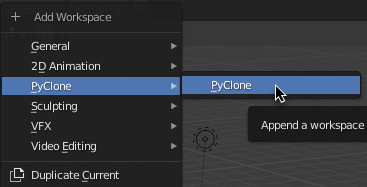
Now that we have Blender open we need to add the PyClone workspace at the top of the interface. Once I add it I prefer to reorder it to the front because it is the most common workspace I use.

Now we need to activate PyClone and the library add-ons.

Go to Edit > Preferences… then select the add-on tab.

First enable the PyClone Add-on. It is important to enable this first because it is responsible for registering the libraries.

Next enable the Home Builder and Toybox Libraries.

Optionally, you can enable the Interface Splitter add-on I find this useful to quickly open different spaces when working in the PyClone Workspace, but this is not required.

Step Three – Save Defaults

If you want Blender to open up this way every time you start Blender you can save the user preferences by selecting the button in the bottom left corner and selecting Save Preferences.
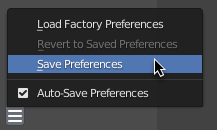
Next go to File > Defaults > Save Startup File. This will save the user interface as default.

Step Four – Verify Everything is Working

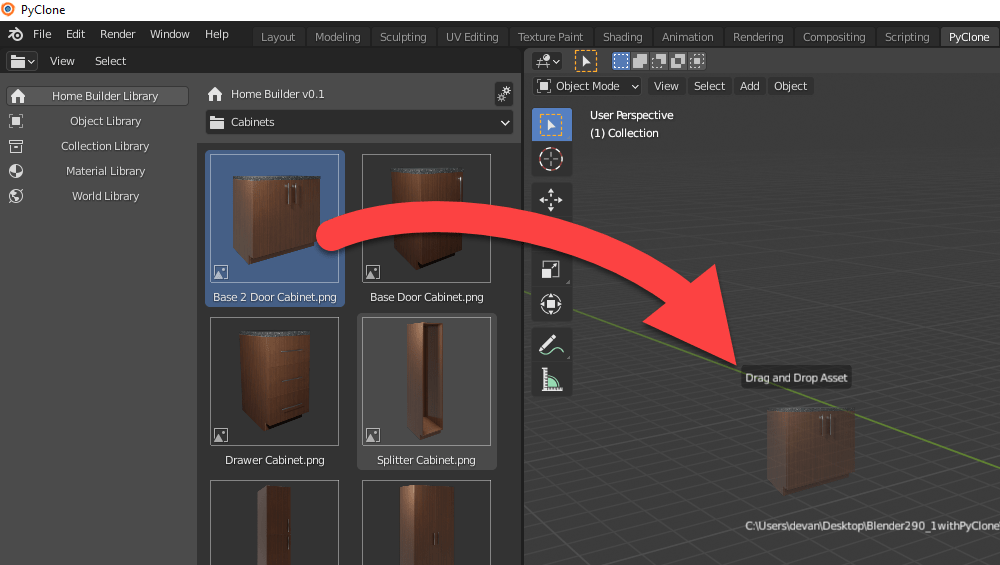
Select the Home Builder Library then go to the Cabinets category, drag an item into the 3D viewport, and then left click to place it.
If you receive an error that looks like this, select Permanently allow execution of scripts checkbox, and then click Allow Execution.
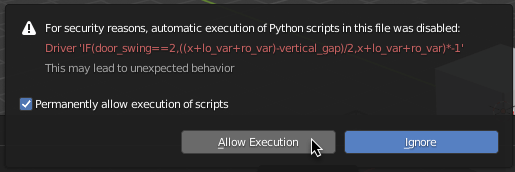
The Home Builder library assets are parametric so they require python drivers to evaluate correctly.

What if it doesn’t work?

If you run into any issues you can use my discord server to ask questions, or you can use the github page to submit an issue.

Discord – https://discord.gg/yxZSbtJFkw

Github Issues Page- https://github.com/CreativeDesigner3D/PyClone/issues

29 responses to “Installing Blender with PyClone 2.90”

  1. Home Builder Asset Library – Creative Designer Avatar

    […] Once you download there are a few steps that should be followed to activate the library. You can find the instructions here. […]

    Like

  2. Richard Osborn Avatar
    Richard Osborn

    Hi, I’ve been following this project on YouTube – it looks amazing and I can’t wait to try it out!

    I have downloaded and followed instructions and get the following error when inserting a model;

    KeyError: ‘bpy_prop_collection[key]: key “Base Cabinet Doors” not found’

    (also happens for “Drawer Fronts”)

    Models without Doors or Drawers (e.g. Range) insert correctly. I wonder if it’s a path issue?

    P.S. tried to contact you via the Discord link above but it says that this link has expired

    Sorry to throw all these errors at you, I know it must be a stressful time during a new release!

    Like

    1. Richard Osborn Avatar
      Richard Osborn

      Panic over!

      Looks like it was a permissions issue. All seem to be working now.

      I should have followed your instructions exactly (you do mention permissions)!

      Liked by 1 person

  3. Victor Avatar
    Victor

    Hi. The discord server invite is no longer valid. Also, I get this error: https://www.dropbox.com/t/hlXjEBfo9C96OSIr

    Like

    1. Andrew Peel Avatar

      I just fixed the discord link. That error is from not having administrative rights to the application so it cannot write the pointer files. Try joining the discord now and we can discuss it on there.

      Like

      1. Victor Avatar
        Victor

        Thank you for your reply Andrew. Windows is apprantely crazy. I have admin account on my own PC and I put the folder inside Program Files/Blender Foundation, right next to the vanilla Blender version.

        It seems I have to run Blender as an Administrator in order for this to work. Who would’ve thought an admin account still has to run apps as an admin.

        Oh well, good thing it works now. Will join the Discord server to keep close to develpment 🙂

        Liked by 1 person

  4. Jack Avatar
    Jack

    Hi, I have problem (while dragging cabinets…)
    Can You look at it? Thx

    Traceback (most recent call last):
    File “C:\Program Files\Blender\Blender290_1withPyClone\2.90\scripts\addons\Library_Home_Builder\cabinets\cabinet_ops.py”, line 293, in modal
    self.confirm_placement(context)
    File “C:\Program Files\Blender\Blender290_1withPyClone\2.90\scripts\addons\Library_Home_Builder\cabinets\cabinet_ops.py”, line 267, in confirm_placement
    self.cabinet.draw()
    File “C:\Program Files\Blender\Blender290_1withPyClone\2.90\scripts\addons\Library_Home_Builder\cabinets\data_cabinets.py”, line 246, in draw
    self.carcass.add_insert(self.carcass.exterior)
    File “C:\Program Files\Blender\Blender290_1withPyClone\2.90\scripts\addons\Library_Home_Builder\cabinets\data_cabinet_carcass.py”, line 444, in add_insert
    insert = self.add_assembly(insert)
    File “C:\Program Files\Blender\Blender290_1withPyClone\2.90\scripts\addons\Library_Home_Builder\pc_lib\pc_types.py”, line 200, in add_assembly
    assembly.draw()
    File “C:\Program Files\Blender\Blender290_1withPyClone\2.90\scripts\addons\Library_Home_Builder\cabinets\data_cabinet_exteriors.py”, line 296, in draw
    self.add_door_panel(l_door_container,is_left_door=True)
    File “C:\Program Files\Blender\Blender290_1withPyClone\2.90\scripts\addons\Library_Home_Builder\cabinets\data_cabinet_exteriors.py”, line 102, in add_door_panel
    pointer = props.cabinet_door_pointers[“Base Cabinet Doors”]
    KeyError: ‘bpy_prop_collection[key]: key “Base Cabinet Doors” not found’

    location: :-1

    Like

    1. Jack Avatar
      Jack

      Now it works! Run as admin… 😉 Excellent job!

      Liked by 1 person

  5. Victor Wachanga Avatar

    thank you… great tool for saving time ..

    Liked by 1 person

  6. Paul Yeomans Avatar
    Paul Yeomans

    Still getting ‘Invalid Invite’ error from discord. Getting errors on trying to add assets to model. Seemed to work fine immediately after installing, but now broken even when running as admin. Will post more details to Discord when available

    Like

  7. homestyles7 Avatar

    Hi, I have a problem (sliding the cabinets …)
    Can you watch it? Thank you

    Traceback (most recent call last):
    File “E:\Nouveau dossier\LOGI\add-on blender\Nouveau dossier\Blender290_1withPyClone\2.90\scripts\addons\Library_Home_Builder\cabinets\cabinet_ops.py”, line 293, in modal
    self.confirm_placement(context)
    File “E:\Nouveau dossier\LOGI\add-on blender\Nouveau dossier\Blender290_1withPyClone\2.90\scripts\addons\Library_Home_Builder\cabinets\cabinet_ops.py”, line 267, in confirm_placement
    self.cabinet.draw()
    File “E:\Nouveau dossier\LOGI\add-on blender\Nouveau dossier\Blender290_1withPyClone\2.90\scripts\addons\Library_Home_Builder\cabinets\data_cabinets.py”, line 246, in draw
    self.carcass.add_insert(self.carcass.exterior)
    File “E:\Nouveau dossier\LOGI\add-on blender\Nouveau dossier\Blender290_1withPyClone\2.90\scripts\addons\Library_Home_Builder\cabinets\data_cabinet_carcass.py”, line 444, in add_insert
    insert = self.add_assembly(insert)
    File “E:\Nouveau dossier\LOGI\add-on blender\Nouveau dossier\Blender290_1withPyClone\2.90\scripts\addons\Library_Home_Builder\pc_lib\pc_types.py”, line 200, in add_assembly
    assembly.draw()
    File “E:\Nouveau dossier\LOGI\add-on blender\Nouveau dossier\Blender290_1withPyClone\2.90\scripts\addons\Library_Home_Builder\cabinets\data_cabinet_exteriors.py”, line 296, in draw
    self.add_door_panel(l_door_container,is_left_door=True)
    File “E:\Nouveau dossier\LOGI\add-on blender\Nouveau dossier\Blender290_1withPyClone\2.90\scripts\addons\Library_Home_Builder\cabinets\data_cabinet_exteriors.py”, line 102, in add_door_panel
    pointer = props.cabinet_door_pointers[“Base Cabinet Doors”]
    KeyError: ‘bpy_prop_collection[key]: key “Base Cabinet Doors” not found’

    location: :-1

    Like

  8. robertrmitse Avatar

    I get a “not found” error when trying to place a cabinet. Walls and the appliances looks like its working

    Like

    1. robertrmitse Avatar
      robertrmitse

      In fact it is there but it shown as bounding box with no front cover (only the white structure)

      Like

      1. robertrmitse Avatar
        robertrmitse

        I solved it. I didnt give blender administrator rights when I started it

        Liked by 1 person

  9. Gary Avatar
    Gary

    This looks like a very early version of articad and that costs a bloody fortune will watch this with interest always thought blender would make a great platform for this i use articad daily to design kitchens and have access to the manufacturers catalogues they supply however blender allows you to do a lot you cannot do with articad

    Like

    1. Andrew Peel Avatar

      Awesome! I have a long ways to go, but I’m looking forward to continue to develop the functionality with input from the community.

      Like

  10. eduarddreyer Avatar

    This looks amazing and everything for free. Is there a way to install it on a MAC?

    Liked by 1 person

    1. Andrew Peel Avatar

      I am hoping to get some developers to help with this.

      Like

  11. bassy Avatar
    bassy

    this is perfect, is it ok if i use it in a game?

    Liked by 1 person

      1. bassy Avatar
        bassy

        thank you

        Like

  12. Bassy Avatar
    Bassy

    thank you

    Like

  13. Eugene Avatar
    Eugene

    Hello!
    I made a build of CreativeDesigner3D/BlenderSource for MacOS Big Sur, but PyClone is not available there as a Workspace and/or Add-ons. Home Builder is not available, too.
    How can I enable it?

    Thank you for your amazing job!

    Like

    1. Andrew Peel Avatar

      You just need to copy the PyClone and Home Builder addons into the addons folder.

      Like

    2. eduarddreyer Avatar

      Would you possibly make the MAC configured program available for all? And will this work on other MAC OS versions besides Big Sur?

      Like

  14. Kurt Euler Avatar
    Kurt Euler

    Hi Andrew. When installing this package, is one creating a dedicated 2.91 PyCharm environment? If so, supposing I have 2.91 installed already which I’ve customized with settings and add-ins. Can I add them to this PyCharm version?

    Thanks!

    Like

    1. Andrew Peel Avatar

      This is a custom build of 2.91. They can share settings, but I am not sure how PyCharm fits in. I use VS Code as an IDE, and I set a specific workspace for this version. I hope this answers your question.

      Like

      1. Norman Gorn Avatar
        Norman Gorn

        Hi Andrew, first of all – thanks for the awesome add-on!
        Just a question, I’m pretty dense when it comes to this kind of stuff.
        Does PyClone Blender replace the normal Blender (as in getting rid of it and still having all the features and getting the normal Blender updates) or do they have to run side-by-side?

        Thanks for your great work!

        Like

  15. Norman Gorn Avatar
    Norman Gorn

    Me again, everything works great, awesome job, Andrew, especially since I’m experiencing lots of problems with Archipack which is NOT free. I think I keep both Blenders just because of the different interfaces – I don’t know how to change them and my menu bar in your explanation looks different from mine…LOL

    Like

Leave a reply to Home Builder Asset Library – Creative Designer Cancel reply