PyClone Asset Manager for Blender 2.83

3–4 minutes

What is PyClone

PyClone is an Add-on for Blender that helps developers create parametric assets, and allows users to register asset libraries.

Since Blender doesn’t currently support drag and drop PyClone is also a custom build of Blender. The custom build can be download here.

How to Install

Below is a link with the a Build of Blender 2.83 for Windows and all of the add-ons included.

If you need to build Blender for a different operating system you can use the Source Code link below.

This build is compiled with the official Blender 2.83.3 LTS code

This download includes Blender, the PyClone Add-on, and the asset libraries listed below.

PyClone is still in development but there are a few example libraries that are available.

The Toybox Asset Library

This library allows users to maintain their own Blender Assets. Currently this library supports Object, Collections, Materials, and Worlds. This is currently in development, but is a good starting point for anyone who wants to maintain their own Blender Assets.
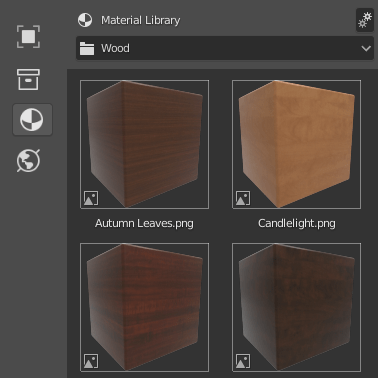
https://github.com/CreativeDesigner3D/Library_Toy_Box

The Home Builder Library

This library helps users with architecture an interior design. This is currently in development. You can find the repository here.
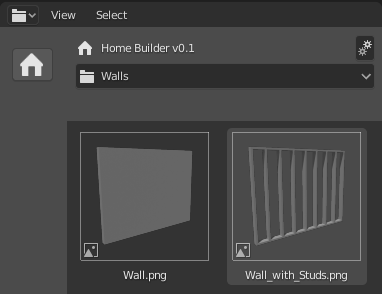
https://github.com/CreativeDesigner3D/Library_Home_Builder

Developing New PyClone Libraries

Developing PyClone Asset Libraries is very similar to developing an add-on for Blender. There are only a few lines of code that you need to register a library.

from .pc_lib import pc_utils

pc_utils.register_library(name="Library Name",
                          activate_id='library.activate',
                          drop_id='library.drop',
                          icon='ICON_NAME')

name – The name of the library.

activate_id – Blender Operator. This is called when the library is activated.

drop_id – Blender Operator. This is called when an item is dropped onto the 3D Viewport.

icon – Name of icon to display in the library. This currently needs to be one of Blenders default icons. There is an Add-on that ships with Blender called “Icon Viewer” that will allow you to see all of the available icons.

If you are creating a new library it is recommended that you review the Toy Box and Home Builder Library first.

Once you have an understanding of how those work then you can use the starter library as a staring point for your library.

https://github.com/CreativeDesigner3D/Library_Starter

PyClone Improvements

There are several improvements that I would like to make to PyClone. Some of them I am not sure where to start. Hopefully Blenders Development team can assist, or at least point me in the right direction.

  • New editor space – Create a new sub type of the file browser to store assets.
  • Better way of loading asset previews – We need a way to load assets into the asset manager region. Currently I just display a directory from your hard drive. This can work in a similar way to bpy.utils.preview, but it would be nice if it could load previews faster. https://docs.blender.org/api/2.83/bpy.utils.previews.html
  • Better way of navigating assets – This will mainly be developed in each asset library. Once we have a way of loading custom previews then we can determine what should be displayed by using search fields, tag system, and filters.
  • Automate thumbnail previews – Blender creates a preview of the blend file, but no previews are generated for ID types (objects, collections, materials, worlds). It would be nice if Blender can automatically do this in the background.
  • Better way of saving multiple assets – This will mainly be developed in each asset library. I have several ideas of how this can be done for the ToyBox Library. I just need more time to develop the functionality.
  • Move some python code to blenders source code – I created a repository of some of the code that I would like to move to Blenders source. https://github.com/CreativeDesigner3D/Blender_Asset_Manager_Prototype

Moving Forward

Hopefully PyClone, or something similar, will be added to blender in an upcoming release.

I will maintain this build until Blenders official asset manager is available.

If you have comments feel free to leave them below.

I also created a forum post on Blenders DevTalk site to discuss ideas on how to move forward.

https://devtalk.blender.org/t/pyclone-asset-management-prototype/13463

64 responses to “PyClone Asset Manager for Blender 2.83”

  1. taholmes160 Avatar
    taholmes160

    Hey Andrew — Way to go man — Is this build of 2.83 production ready? or should I wait till after the actual release? — Again, Congrats — well done

    Liked by 1 person

    1. Andrew Peel Avatar

      This is built on the 2.83 beta version, so it will probably be best to wait.

      Like

      1. taholmes160 Avatar
        taholmes160

        Whats your timeline for a stable release after the 2.83 release on June 3?

        Liked by 1 person

      2. Andrew Peel Avatar

        Yeah I will create a build right when 2.83 is officially released, so it will likely be available the same day or the day after the release.

        Like

  2. Franziska Avatar

    Hi Andrew,

    looks good already.
    I and I’m sure many others apprechiate the work you put in there. Thank you!

    One thing I was wondering is if an existing folder structure could be made to work with this.

    Personally I have for example a directory called

    PARTS which splits into
    3D and 2D following the 3D directory I have subdirectories with
    CHAIRS, TABLES, BEDS and so on which may in turn have sub directories which contain the model of one specific chair and all its related assets as well as models of the same chair in other file formats. There may be even more info like suppliers details and so on in these subdirectories

    Not sure if this could be done somehow.

    Please make sure that your system can also be used offline in the future.

    All the best,

    Fran

    Liked by 1 person

    1. Andrew Peel Avatar

      It’s currently not possible to have sub directories, but I am sure this will be available with the official release. Also, all assets are currently stored locally so they can be used offline.

      Like

  3. Franziska Avatar

    Thanks Andrew.

    Subdirectories would be awesome. Maybe with a filter to show a few different file formats (by choice).
    Maybe for now you could allow to show all blend files in every directory under the choosen root path?
    I.e, not showing by each directory but the lot together?

    No pressure 😉 I’m happy someone is clever enough to create something like this!

    Kind regards,

    Fran

    Liked by 1 person

    1. Andrew Peel Avatar

      Yeah these are really good ideas. thanks.

      Like

  4. MR HOLLYWOOD Avatar
    MR HOLLYWOOD

    DITTO ………. Franziska. couldn’t put it much better. You’ve done and really GREAT job with this.

    Liked by 1 person

  5. Franziska Avatar

    One more regarding file formats.

    Luckily the 3Ds importer is back in 2.83.
    There are still heaps of free furniture assets with this format around.
    I’d think eventually this should be one of the formats included as well.

    Apart from blend and obj and some newer ones.

    Happy to give you ideas!

    Liked by 1 person

  6. Danny Araya (@DannyAraya) Avatar

    Is there somewhere specific we can go for troubleshooting/issues? For example I don’t seem to have the PyClone Workspace in mine and am having a little trouble accessing the libraries as a result.

    Like

    1. Andrew Peel Avatar

      Looks like I forgot to add the App Template to the new build. I will fix this now. Try to download it again in like 30 minutes.

      Like

  7. diegopadovani Avatar

    This addon is soooooo amazing! Definitely it should be built-in Blender by default! As an architect Im seeing Blender more and more architectural friendly and addons developers like you make all the difference! Thank you!

    Like

    1. taholmes160 Avatar
      taholmes160

      Diegopadovani:

      Please contact me via e-mail at taholmes160 at gmail dot com
      I do architectural renderings using blender and I’d like to touch base with you
      TIM

      Like

  8. serviteur Avatar

    Hi Andrew,

    I have a problem with Blender283LTSwithPyClone. No OptiX found on Blender Preferences>System>Cycles Render…

    Like

    1. Andrew Peel Avatar

      Yeah I will create another Build with Optix Enabled. I should have it ready next week.

      Like

      1. Gerard T Avatar
        Gerard T

        Ok and thanks.

        Like

  9. rangan Avatar
    rangan

    Thanks Andrew for your effort and time in improvement of blender. you have simplified the asset manager. We all blenderers appreciate your initiative. Great.

    Like

  10. Chris K Avatar
    Chris K

    Nice Work!

    How do I install from Source Code? (MacOS)

    Like

    1. Andrew Peel Avatar

      Here is a link to the Source Code and instructions on how to Build Blender. I hope this helps.

      https://github.com/CreativeDesigner3D/BlenderSource

      https://wiki.blender.org/wiki/Building_Blender

      Like

  11. Gerard T Avatar
    Gerard T

    Hey,
    Build with Optix Enabled it’s done?

    Like

    1. Andrew Peel Avatar

      Sorry it took me a bit to figure out how to build with Optix. I just got an RTX card so I am testing it now. If it works it will be up in the next few hours.

      Like

      1. Gerard T Avatar
        Gerard T

        Awesome!!

        Like

      2. Franziska Avatar

        Hi Andrew,

        I recently switched to E-Cycles, which comes as well with its own Blender installation.
        He has a 2.83 and a 2.90 version. Is there a chance to add your asset library to E-Cycles?

        Right now I am using Asset Wizard, but your solution looks better.

        Best regards,

        Fran

        Like

      3. Andrew Peel Avatar

        I would need access to the source code, but it will probably be a bit much for me to maintain. You can always design the scene using PyClone then open up the file in E-Cycles to render. Also, Blenders Official Asset Engine will be available soon.

        Like

      4. Franziska Avatar

        OK. Thanks, than I’ll wait for the official version. He’s usually very good in maintaining his version close to the official releases.
        Btw. will the official asset manager resemble PyClones or did they cook up something very different?

        Like

      5. Andrew Peel Avatar

        The Official Asset Manager will have a lot of the same functionality, but hopefully it will be better.

        Like

  12. Gerard T Avatar
    Gerard T

    Optix enabled now.
    Thanks so much Andrew.

    Liked by 1 person

  13. Gerard T Avatar
    Gerard T

    Can Archipack Pro work with the Home Builder Library?

    Like

    1. Andrew Peel Avatar

      It depends on what you mean by “work with”. You can use both at the same time.

      Like

      1. Gerard T Avatar
        Gerard T

        Home Builder v0.1 has a free Archipack addon by default!

        Like

      2. Andrew Peel Avatar

        Oh right. This was just added as an example. Since Archipack Pro is paid it wouldn’t be right for me to include it. Currently Home Builder is just a sand box for me to test different functionality, but over the next few months I will be spending more development time on it. I will release an official video when it is ready.

        Like

  14. Gerard T Avatar
    Gerard T

    Okay.

    Like

  15. […] The Blender Asset Engine is still in development. You can find more information about this project here. […]

    Like

  16. Tofazzal Hossain Avatar
    Tofazzal Hossain

    Hi Sir, Have any corse to lern all the things?

    Like

  17. Gerard T Avatar
    Gerard T

    Hey Andrew,

    Can you please also develop some few libraries:

    – 3D animation People
    – 3D animation Car
    – 3D animation Plants (…)
    – Weather 3D animation (Rain and snow)

    Example with Twinmotion:
    1-https://www.youtube.com/watch?v=KiVeP6muWbw
    2-https://www.youtube.com/channel/UCOjK8lWjcjDowBMKV7n3xhA

    Assets for 3D Peoples Animated:
    -https://secure.axyz-design.com/

    Assets for 3D Car Animated:
    -https://www.cgtrader.com/animated-3d-models/car

    Assets for 3D Plant Animated:
    -https://www.cgtrader.com/animated-3d-models/plant

    Like

    1. Andrew Peel Avatar

      These are great ideas. Recreating functionality like Twinmotion in Blender would be amazing, but this is a huge project. This is my end goal but will likely take sometime to develop.

      Like

      1. Gerard T Avatar
        Gerard T

        Thanks for your reply.

        Liked by 1 person

  18. Kornel Avatar
    Kornel

    Great work

    Liked by 1 person

  19. MR HOLLYWOOD Avatar
    MR HOLLYWOOD

    Hi Andrew: Thanks again for your GENEROUS offering to the Blender Community.
    I have tried to set up and load some of my and other models. Some come in so small I can’t ever see them and other the total opposite. I’m changing some of my obj’s to blend files. Do you or anyone here have an idea what I may be doing wrong.

    Like

    1. Andrew Peel Avatar

      It’s hard to say without seeing the issue. If you create a screen capture of your process I can take a look and see what is going wrong.

      Like

  20. Gerard T Avatar
    Gerard T

    Hey Andrew,
    Is Pyclone Asset Libraries will implement into the next Blender 2.90?

    Like

    1. Andrew Peel Avatar

      I will be migrating the libraries when the official asset engine is available. It might not be available till 2.91 or 2.92.

      Like

      1. Gerard T Avatar
        Gerard T

        Thank you for information.

        Like

  21. Kornel Avatar
    Kornel

    I have problem with material liblary: If material name in blend file start from “A,B,C,D”, for ex: “Bark001”, material is imported as “Dots Stroke. My liblary was created by script. If i add material manualy everything goes well. Thanks for your work.

    Like

  22. […] PyClone Asset Manager for Blender 2.83 |Creative Designer […]

    Like

  23. Matthew Avatar
    Matthew

    Love this! I am having some issues trying to save materials. Often they don’t save, or no preview is generated. Also, might I suggest allowing for different types of preview objects, including something created by the user (for material previews).

    Also, I’m not sure if these are made using cycles or EEVEE, but the previews do not accurately depict what it will look like. Perhaps there should be both a Cycles and EEVEE preview that can be toggled. It does seem like there should be a whole bunch of settings to setup previews, including lighting, etc.

    Sub-Categories would be good as well. Think ‘METALS’ > ‘ALUMINUM’ > ‘SATIN’, ‘BRUSHED’, ‘BURNISHED’ or ‘POLISHED’. Of course some of this could be solved by tags, though METALS > ALUMINUM, COPPER, IRON, STEEL, BRASS, ETC, would make sense.

    I have been waiting patiently to see these types of features added to blender. I hope these asset management features are integrated into the official builds soon!

    Like

    1. Andrew Peel Avatar

      I would have to see what you are doing. But make sure the file is saved before you save the material.

      Your ideas are great and will be included in a future release. Thanks for the feedback.

      Like

  24. Corey Corza Avatar
    Corey Corza

    Hi Andrew, awesome work!
    I’ve added a test category to test this out, but how do I delete the test category now?
    Thanks

    Liked by 1 person

    1. Corey Corza Avatar
      Corey Corza

      I figured it out 🙂

      Liked by 1 person

      1. Andrew Peel Avatar

        Sorry for the delay in response. I plan on making managing your library data easier and more intuitive, but i’m glad to hear you got it worked out.

        Like

  25. juliolvieira Avatar

    Hi Andrew! Your work is really amazing!
    Any chance of getting a macosx compatible version addon?

    Thanks!

    Liked by 1 person

    1. Andrew Peel Avatar

      I currently don’t have a way to build a macosx version, but once the asset manager is available in standard version of Blender then all of the libraries I am making will be available for all OS platforms.

      Like

  26. GUAN Avatar
    GUAN

    Can I download Pyclone Only ? without the Blender. Thank you~

    Liked by 1 person

    1. Andrew Peel Avatar

      Yeah here is the repo to the add-on. Keep in mind that drag and drop only works with the custom build. https://github.com/CreativeDesigner3D/PyClone

      Like

  27. Acesrea Prime Avatar
    Acesrea Prime

    Holly molly.. I really can’t wait for the stable release since.. I prefer something like ‘Pro version’. Or Im missing the purchase page, please link me to it. Hopefully it will support up to Blender 2.9.

    Liked by 1 person

    1. Andrew Peel Avatar

      I will have a release that works for the 2.90 release soon.

      Like

  28. Oluwatobiloba Emmanuel Avatar
    Oluwatobiloba Emmanuel

    I’m wowed at this!!! really!!! amazing project! I have some ideas I would like that you include in the asset import library, could you add an option to allow one to chose between linking and append… for scene memory management… and also under the link option, a way to edit saved asset and reload after edit (Blender 2.7 had this feature, its still present in 2.9 but its not as convenient like it used to be). Thanks a lot.

    Liked by 1 person

    1. Andrew Peel Avatar

      Yeah being able to link and/or append will be added along with the ability to reload assets.

      Like

  29. Andrea Piovesana Avatar

    Super work I hope for Blender standard version

    Like

  30. uexrhsdrkq Avatar

    Muchas gracias. ?Como puedo iniciar sesion?

    Like

  31. […] PyClone Asset Manager for Blender 2.83 |Creative Designer […]

    Like

Leave a reply to rangan Cancel reply