Home Builder 4

3–5 minutes

With the release of Blender 4 some changes need to be made to Home Builder to get the add-on working with the latest release. To avoid confusion and keep things lined up with Blender I am going to roll the number to Home Builder 4 which works with the latest version of Blender.

This version will only work with Blender 4. I will keep the previous version of Home Builder around for anyone who needs to use Blender 3.6, but all new development will be done on Home Builder 4.

If you watched the previous video on Home Builder 3. You will know that there are a number of tasks I was working on before I release the official version of Home Builder. These tasks included:

  • Tutorials & Documentation
  • 2D Layout Views
  • Migrating the Extended Asset Library
  • Manufacturing
  • Geometry Nodes

I have made good progress on all of these tasks, but there are a few things to wrap up before the official release.

Tutorials & Documentation

This will be an ongoing project, but I have an online platform to store Home Builder documentation that is easy to maintain. For now I am considering this task done, but I plan to create a lot more written and video tutorials for Home Builder.

You can view the documentation here.

2D Layout Views

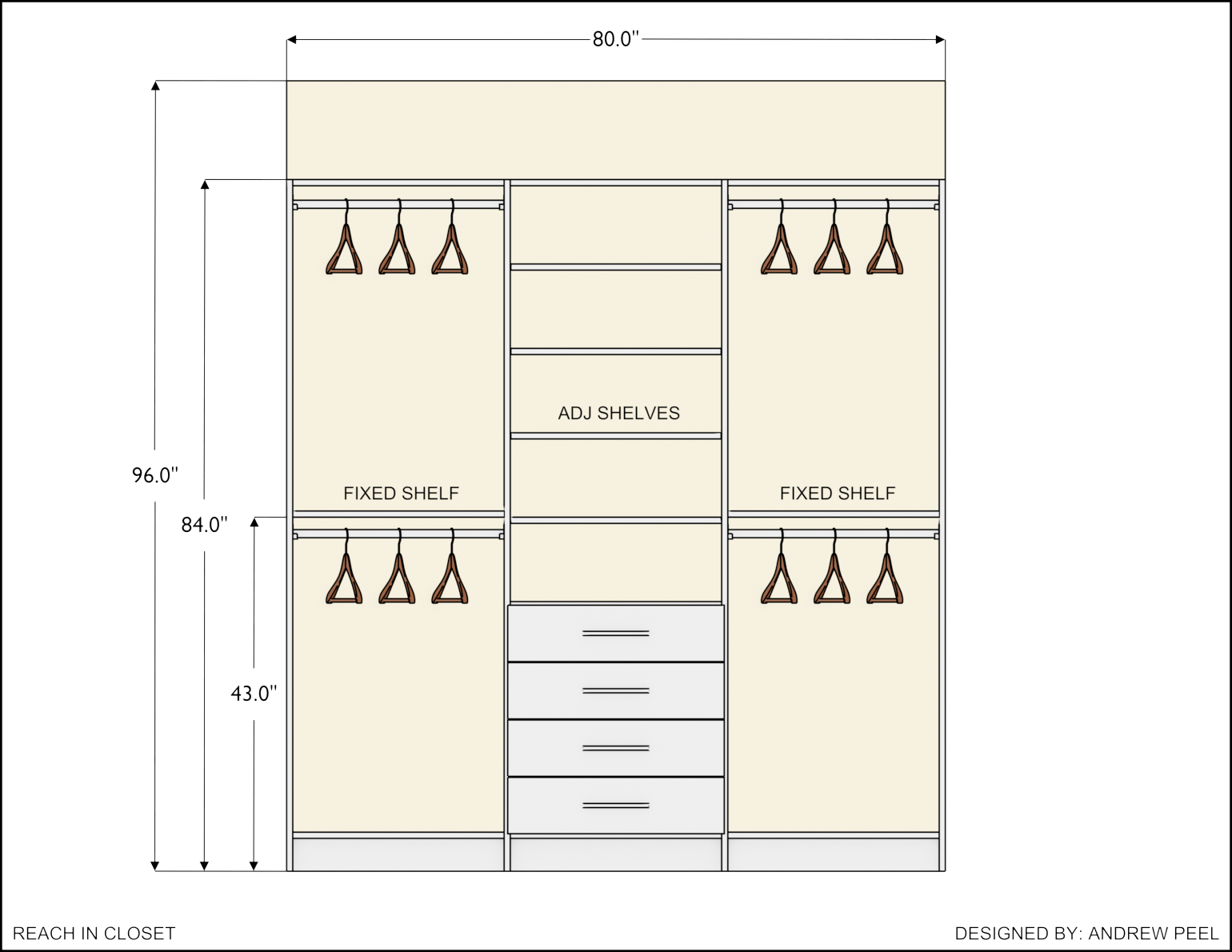
This feature is designed to create quick plan and elevation drawings for designers.

If you are an architect designing entire buildings these drawings might not contain enough details for your work, but currently work well for Kitchen, Bath, and Closet Designers. This feature will be improved in future releases.

Here are some examples that can be created with Home Builder.

Migrating the Extended Asset Library

The first release of the extended asset library was basically a bunch of additional assets that loaded into the library which is nice, but I want the paid aspect of Home Builder to be geared towards professional designers. So the next release of the extended asset library will include a professional kitchen and closet design library.

These libraries are still being developed, but anyone who purchased the extended asset library will automatically get access to these libraries when they are available.

These libraries will not only include all of the components to design specific spaces, but will include improved placement functionality, and automated creation of 2D drawing for these types of spaces.

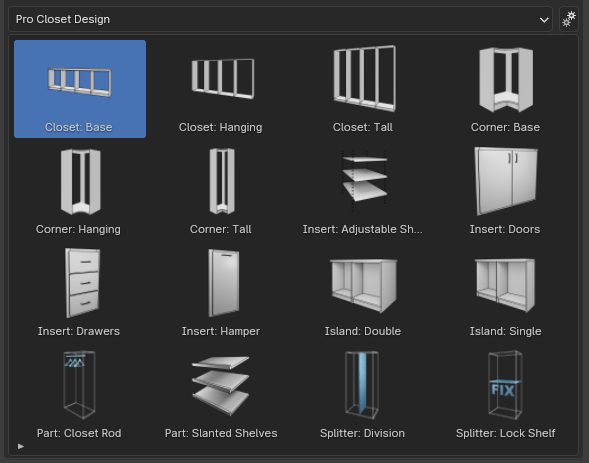
Example: Professional Kitchen Design Library (This library will be extended for the official release)
Example: Professional Closet Design Library (This library will be extended for the official release)

Manufacturing

Being able to manufacture the cabinets used in your design is an important aspect to this project. With the implementation of Geometry Nodes cabinet cut parts now have specific properties that define their length, width, and thickness to accurately report part sizes.

Example reports will be included in the professional design libraries, but customizations may need to be made to get company specific construction and pricing information.

Geometry Nodes

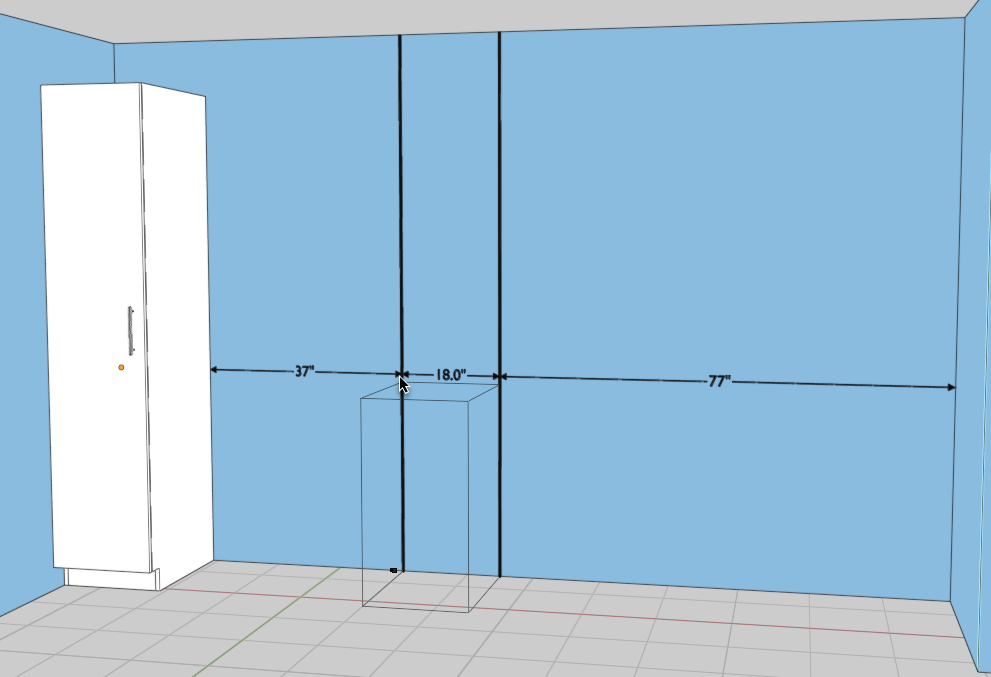
Geometry Nodes are now being used in Home Builder to create a large part of the geometry for Home Builder assets. All of the cabinets available in the professional libraries are created using pre setup node groups. The dimensions that display in the 2D Layout Views and during placement commands are also created using geometry nodes. 
What Needs to Be Finished

I am getting close to being able to release the official version of Home Builder, but there are a few fixes that need to be made.

  • Metric and Imperial Dimensions – Since I am now using geometry nodes to create dimensions. I need to find a way to access the scene unit settings through geometry nodes. If there are users who are familiar with geometry nodes and might know a way to solve this please reach out on discord or my contact page.
  • Placing Dimensions on Layout Views – Placing dimensions is easy to do with the new system, but for some reason ray casting doesn’t work when viewing an elevation from the camera view. If there are any developers who are familiar with ray casting using the Blender Python API please reach out on discord or my contact page.
  • Finish Professional Libraries for Extended Asset Library – I am working with some professionals on developing the best possible workflow for designing kitchens, baths, and closets.

Timeline

The beta of Home Builder 4 is available now, but I don’t have a release date for the official version. My goal is to make it available in Q1 of 2024.

Thank you everyone for being patient while I develop this add-on. I hope the beta version is helpful while I continue development of the next libraries. I will have more information available as soon as possible.

58 responses to “Home Builder 4”

  1. Mangostien_ Avatar
    Mangostien_

    Question for you king.

    This is my first time working with your addon, (its legendary, my goodness)
    I was wondering how I can convert these to mesh? So the home builder features dont affect them anymore and I can treat them like “vanilla” objects? I have tried any way I can think of.

    Other than that, I just wanted its been a lovely experience working with this tool and I am so excited to see what all can be done with it. Thank you so much for releasing something so handy!!

    Like

    1. Andrew Peel Avatar

      There is a command in the sidebar to make home builder objects static. It is available from the Assembly panel in the sidebar. If you ask on discord I can show you a screen shot.

      Like

  2. Mukondeleli Ratshilavhi Avatar
    Mukondeleli Ratshilavhi

    Hey Andrew quick question where do i download homebuilder4 beta Ive not seen any linkon the page nor youtube.

    Like

    1. Andrew Peel Avatar

      I will update the post to make it more clear. It is available in the documentation. https://creativedesigner3d.github.io/home_builder_3_docs/01_getting_started/

      Like

      1. brad Avatar
        brad

        Hello Andrew,

        I am trying to load the add-on and the blender 4.2 screen is not giving me the install button I am looking for, would you please help to get it going on this Mac computer?

        It looks awesome what you showed in the video.

        Thank you,

        Brad

        Like

  3. Titus Avatar
    Titus

    Hei Andrew, I have a question. The display of the units on the wall is only in inches?

    Like

    1. Andrew Peel Avatar

      If you are on Home Builder v4.0.2 it will show millimeters if your Blender unit setting is set to metric.

      Like

  4. appreciator Avatar
    appreciator

    Honestly I just wanted to leave a comment to say how AWESOME even the beta has been for me. For how numerous procedural building addons there are in the market out there, having something that’s tailor made for INTERIOR design as well is such a breath of fresh air.

    I’ll be following this addon with great interest.

    Liked by 1 person

    1. appreciator Avatar
      appreciator

      So uh I’ll tack on an actual question here. In v4, it seems there’s no other way to convert to mesh other than to just delete the construct hierarchies, is that correct?

      As in, there’s no shortcut buttons or anything, but it can be done with normal object deletion, once we’re happy with the final construct made with the addon?

      Like

      1. Andrew Peel Avatar

        There is a command to apply all modifiers, or convert to a static mesh that can be found in the assembly menu. If you ask in discord I can provide you a screenshot.

        Like

  5. appreciator Avatar
    appreciator

    I actually did know to look at it beforehand, but couldn’t find it last time. But NOW I just realized it was in the Item sidebar thingamagic, instead of the native Home Builder panel. Thanks a lot!

    Hope my comment here will help out future Blender folks who were confused as I were.

    Like

  6. Carsten Teschner Avatar
    Carsten Teschner

    Where to buy the extended asset library?

    Like

  7. حمزة البرامي Avatar
    حمزة البرامي

    Hello!

    When I try to enable the add on after installing it, it gives me a long error message, please help 😦

    Like

    1. Andrew Peel Avatar

      Make sure you are following the instructions here. https://creativedesigner3d.github.io/home_builder_3_docs/01_getting_started/ If you are still having issues ask on discord, so I can get more information about the error.

      Like

  8. Motona Designz Avatar
    Motona Designz

    the following error appears when trying to install

    Traceback (most recent call last):
    File “C:Program FilesBlender FoundationBlender 4.04.0scriptsmodulesaddon_utils.py”, line 364, in enable
    mod = importlib.import_module(module_name)
    File “C:Program FilesBlender FoundationBlender 4.04.0pythonlibimportlib__init__.py”, line 126, in import_module
    return bootstrap._gcd_import(name[level:], package, level) File “”, line 1050, in _gcd_import File “”, line 1027, in _find_and_load File “”, line 1006, in _find_and_load_unlocked File “”, line 688, in _load_unlocked File “”, line 883, in exec_module File “”, line 241, in _call_with_frames_removed File “C:UsersAdminAppDataRoamingBlender FoundationBlender4.0scriptsaddonshome_builder_4__init_.py”, line 22, in
    from .pyclone_ops import pc_layout_view
    File “C:UsersAdminAppDataRoamingBlender FoundationBlender4.0scriptsaddonshome_builder_4pyclone_opspc_layout_view.py”, line 479, in
    class pc_layout_view_OT_add_elevation_dimension(pc_snap.Drop_Operator):
    AttributeError: module ‘pc_lib.pc_snap’ has no attribute ‘Drop_Operator’

    Like

    1. Andrew Peel Avatar

      This is because you still have Home Builder 3 installed. Remove Home Builder 3 and restart Blender before installing Home Builder 4.

      Like

  9. Xegan Avatar
    Xegan

    First wanna say this is an amazing add-on for Blender and so glad I found out about it while browsing youtube today.

    Currently the only issue I’m having with it though in the 4.0.2 version is that holding control doesn’t acivate the rotation of the wall while placing it.

    Like

  10. Biren Patel Avatar
    Biren Patel

    Hello Andrew,

    Just want to start off saying this is an amazing tool and bravo on sharing this with the 3D community. Much appreciated!

    How can I get access to the Pro Assets/Library?

    Like

  11. Deep Singh Avatar
    Deep Singh

    no beds?

    Like

    1. Andrew Peel Avatar

      I will be adding more assets, but the main focus right now is cabinetry.

      Like

  12. Nayara Avatar
    Nayara

    I’m so excited about this add-on, but I can’t find a link to download it. Am I missing something? Thank you in advance!

    Like

      1. Nayara Avatar
        Nayara

        Thank you for replying! I’m quite new to installing add-ons from the web so I’m a bit confused about the documentation list… I don’t quite know what to download from there.

        Like

  13. […] HOME BUILDER 4 INFOhttps://creativedesigner3d.com/2023/12/14/home-builder-4/ […]

    Like

  14. Kai Avatar
    Kai

    hi

    Like

  15. dyvintvar Avatar
    dyvintvar

    How do I download Homebuilder 4?

    Like

  16. brunolibanohotmailcom Avatar
    brunolibanohotmailcom

    Hi, The new asset librery block the home builder when is instaled. I have Blender 4.1. Can you help me please?

    Thanks and congrats for this amzing addom.

    Like

  17. Omar Avatar
    Omar

    hey Andrew i was wondering if u could fix this error: Python: Traceback (most recent call last):File “C:UsersmoryAppDataRoamingBlender FoundationBlender4.1scriptsaddonshome_builder_4assetsproductssample_cabinetsdrop_ops_cabinet.py”, line 179, in executeself.get_cabinet(context)File “C:UsersmoryAppDataRoamingBlender FoundationBlender4.1scriptsaddonshome_builder_4assetsproductssample_cabinetsdrop_ops_cabinet.py”, line 201, in get_cabinetself.cabinet.draw()File “C:UsersmoryAppDataRoamingBlender FoundationBlender4.1scriptsaddonshome_builder_4assetsproductssample_cabinetstypes_cabinet.py”, line 366, in drawself.create_assembly(“Cabinet”)File “C:UsersmoryAppDataRoamingBlender FoundationBlender4.1scriptsaddonshome_builder_4python_libspc_libpc_types.py”, line 367, in create_assemblybpy.ops.object.select_all(action=’DESELECT’)File “C:Program FilesBlender FoundationBlender 4.14.1scriptsmodulesbpyops.py”, line 109, in callret = _op_call(self.idname_py(), kw)^^^^^^^^^^^^^^^^^^^^^^^^^^^^^^RuntimeError: Operator bpy.ops.object.select_all.poll() failed, context is incorrect i can do walls but i can’t drag and drop assets

    if you could reply it would be a pleasure

    Like

    1. Andrew Peel Avatar

      This is typically caused by trying to drop assets while in edit mode. Make sure you are in object mode. If you are still running into issues try asking on discord it will be easier to help you there.

      Like

      1. Omar Avatar
        Omar

        thx alot andrew your addon is amazing i cant belive how u made it easy for me

        Liked by 1 person

  18. Dinesh Avatar
    Dinesh

    Hi Andrew

    Your preseason tool is nothing short of brilliant. The fact that you managed to create something so complex yet incredibly user-friendly is a testament to your skills. It’s clear you’ve put a lot of thought into making the tool accessible to a wide range of users without sacrificing functionality. This is the kind of innovation that The “AutoCAD” in Blender.

    Liked by 1 person

  19. Indiana Avatar
    Indiana

    Hello Andrew!

    This add-on is incredible! Ive been exploring it for a of couple hours and I can already tell that this is a huge upgrade from what I have been using. I do have one question though: can you create corner cabinets? I don’t see anything like that in the cabinet prompts tab.

    Thank you so much, you have some major skills.

    Like

    1. Andrew Peel Avatar

      I will be adding corner cabinets to the library soon.

      Like

  20. Gary Avatar
    Gary

    How do I add more assets to the library? Do you have them available or are they available somewhere else? I’m new to blender so please explain it like an idiot would understand…

    Like

    1. Andrew Peel Avatar

      I am working on adding more assets to the library, but there are a lot of other sites that have high quality assets. Check out. https://www.poliigon.com/ and https://imeshh.com/

      Like

  21. jherrr Avatar
    jherrr

    Hello i’m new here how to download Homebuilder 4?

    Like

    1. Andrew Peel Avatar

      The download is available in the documentation. Here is the link. https://creativedesigner3d.github.io/home_builder_3_docs/01_getting_started/

      Like

  22. HL Avatar
    HL

    Hi, Andrew. First of all, great work!
    Secondly, where can I find the PRO version you mentioned in your videos?

    Thanks

    Like

    1. Andrew Peel Avatar

      Thanks. I am still working on the pro version. I will be releasing information when it is available.

      Like

  23. Sithembelo Gabela Avatar
    Sithembelo Gabela

    Hey, how do I add windows that aren’t from the sample library to walls? Or is there a way to edit the windows?

    Like

  24. Leon Zhang Avatar
    Leon Zhang

    Hi Andrew! I’m using Home Builder 4 and really enjoying its flexibility for interior design projects. I have a question about creating French-style wall frames. Is there a way to parameterize the design of wall panels for French moldings, including adjusting their position, layout, and even customizing the cross-section of the moldings? It would be incredibly helpful for projects where I need precise control over these details. Any guidance or suggestions would be much appreciated. Thanks!

    Like

  25. Ertugrul YILDIRIM Avatar
    Ertugrul YILDIRIM

    Hi Andrew,

    First of all, I congratulate you for your efforts.

    You are on a great path, but Home Builder is not in a position to fully meet the needs of the user in its current state.
    For example,
    Ceramic types used between countertops
    For example, marble, ceramic or wood coating types on the kitchen surface.
    (For companies selling ceramics, applications according to ceramics in bathrooms are also important, as well as glass shower cabins, etc.)
    I am also aware that you have taken on a great burden on your own. I wish I could support you in this regard.
    As you know, there are different types of cabinet doors and they are in use
    In addition, there are many types of coating materials for them.
    As someone who has been doing this work for a long time, don’t we have the opportunity to add different models of cabinet doors? I constantly have to remodel the doors in 3D.
    If it helps, I can send you the drawings of the door types we have used so far. Or if you shoot a video where we can easily create a library parametrically. I can send you the door types I add over time.

    Best regards.
    Thanks.

    Like

  26. Osvaldo maltos Avatar
    Osvaldo maltos

    Hey Andrew, is it possible to draw walls in Feet instead of inches?

    Like

  27. […] NOTE: THIS IS A FREE ADDON – CHECK https://creativedesigner3d.com/2023/12/14/home-builder-4/ […]

    Like

  28. Steven Avatar
    Steven

    Thanks Andrew,

    Like

  29. Saran S R Avatar
    Saran S R

    Hi Andrew ,

    When rendering, door openings are shown as solid white. What could be the issue?

    Thank you

    Like

    1. Andrew Peel Avatar

      I would need to see a screen shot. Feel free to ask on discord so I can help you out.

      Like

  30. Hussain Aljadi Avatar
    Hussain Aljadi

    Hello Andrew,

    I’ve been experiencing some lag while using Home Builder, and it’s starting to affect my experience. For example, after I finish the kitchen, whenever I try to add more items, the Home Builder page becomes unresponsive, though Blinder works fine.

    My device is an iMac M4 with 16GB of RAM. Could you please assist me with this issue?

    Thank you

    Like

  31. Jose Avatar
    Jose

    Hi thanks for the great addon for blender. I would like to know if there is any way to create a four wall construction in which one of the corners is round with a radius of 5 meters.
    I have a plot that has an irregular shape in which one of the corners is rounded and each of the walls have different dimensions. I have searched for tutorials on youtube but have not found any where they elaborate irregular constructions. Sorry if I didn’t explain well, I don’t speak English and I translated this with DeepL

    Like

  32. Susil Baral Avatar
    Susil Baral

    Great Home builder is amazing , makes my work easier and faster .

    Where to find the extended asset library …..?

    Like

  33. ji Avatar
    ji

    Can I use this addon in my cartoon and make money sir…?

    Like

    1. Andrew Peel Avatar

      Yeah. You can use Home Builder for any reason.

      Like

  34. joseph Avatar
    joseph

    hello, ever since Blender 5.0 was launched recently, i am trying to add this addon to the latest version but it kept saying “no module nameds bgl“, and i am trying to build more project within the newest blender version. am using the homebuilder 4.

    Like

  35. Andrew Peel Avatar

    Yeah Home Builder will not work with Blender 5.0. The Blender Devs removed a component called the template_asset_view which is used in Home Builder. I have already discussed this with them. I think we will come up with a solution, but it will likely be in 5.1.

    Like

  36. Always Paid Avatar
    Always Paid

    hello my friend are you still working with your home builder 4 addon? i just installed blender 5.0 and im having a issue with addon this is my error: Python: Traceback (most recent call last): File “C:\Program Files\Blender Foundation\Blender 5.0\5.0\scripts\addons_core\bl_pkg\bl_extension_ops.py”, line 1502, in execute cmd_batch = self.exec_command_iter(is_modal) ^^^^^^^^^^^^^^^^^^^^^^^^^^^^^^^^ File “C:\Program Files\Blender Foundation\Blender 5.0\5.0\scripts\addons_core\bl_pkg\bl_extension_ops.py”, line 2593, in exec_command_iter self.exec_legacy(source_filepath) File “C:\Program Files\Blender Foundation\Blender 5.0\5.0\scripts\addons_core\bl_pkg\bl_extension_ops.py”, line 2726, in exec_legacy bpy.types.PREFERENCES_OT_addon_install.execute(self, bpy.context) File “C:\Program Files\Blender Foundation\Blender 5.0\5.0\scripts\startup\bl_operators\userpref.py”, line 830, in execute bpy.ops.preferences.addon_enable(module=mod.name) File “C:\Program Files\Blender Foundation\Blender 5.0\5.0\scripts\modules\bpy\ops.py”, line 109, in call ret = _op_call(self.idname_py(), kw) ^^^^^^^^^^^^^^^^^^^^^^^^^^^^^^ RuntimeError: Error: No module named ‘bgl’ No module named ‘bgl’

    Like

    1. Andrew Peel Avatar

      I am working on getting Home Builder working with Blender 5.0. I will release information when it is available.

      Like

      1. SARAH W NETTESHEIM Avatar
        SARAH W NETTESHEIM

        Hi Andrew,

        Thank you for working on this and for this amazing addon! I eagerly await the new release that works with Blender 5.

        Like

Leave a comment